
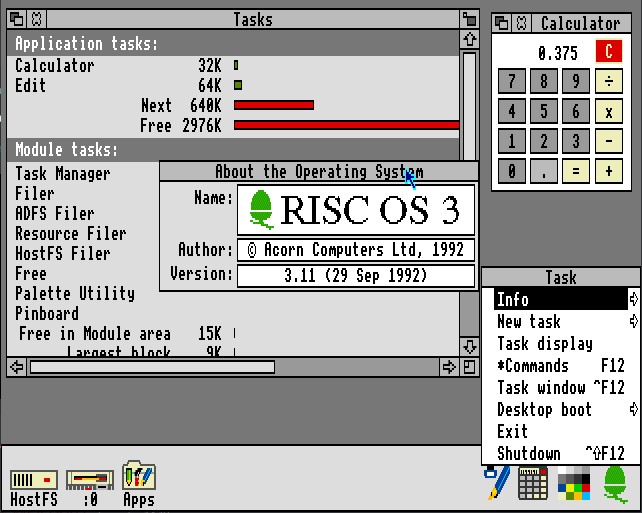
RISC OS
RISC OS is an operating system designed by Acorn Computers for their Archimedes line of computers (I have an A3010) and later used in its RiscPC (which I don’t have).
In 1999 Acorn restructured, stopped making workstations (especially the development of the Risc PC 2 aka Phoebe). RISC OS rights were sold to RISCOS Ltd. and Pace acquired RISC OS NC (see below for details).
Pace used RISC OS NC (RISC OS Network Computer) in set-top boxes such as the Bush Internet TV (I have a Bush IBX200 made by Pace) and eventually sold the rights to Castle Technology who used it for their Iyonix.
RISCOS Ltd. released it as the RISC OS 4 fork (and RISC OS Select, RISC OS Adjust and RISC OS Six). Eventually, it was recombed into RISC OS 5 and released as open source by RISC OS Open.
Hardware requirements
The original versions of RISC OS up to version 3.11 were designed for the Archimedes line of computers specifically. It would only run on ARM 2 and 3 machines and required the complete chip set, i.e. IOC (I/O Controller), MEMC (Memory Controller) and VIDC (Video Controller). RAM requirements were in the order of 0.5 Mbytes on the A305 up to 4 Mbytes. More could be utilised with the addition of a slave MEMC. I read on RISCOS Open forums (and I think other places) that the A540 had 3 slave MEMCs and a PAL chip to mess with the logic to page them in and out.
The later 3.50 to 3.71 versions were altered to support the chip set of the Risc PC, and would not run on those earlier Archimedes machines. Along with a newer ARM processor, the RiscPC chip set consisted of the VIDC20 (Video Controller – which also handled Sound) and IOMD (Input/Output Memory Device – replaced the IOC and MEMC).
RISC OS started to be developed by others after version 3.71 and it was ported to other hardware by them.
Version 5 is now open source and runs on the Raspberry Pi and other single board computers. See the RISC OS Open website for more information on compatibility.
The basics
The RISC OS operating system features a core kernel augmented with a number of modules. The whole thing is located in ROM (later revisions having progressively larger amounts of it).
The modules provided much of the operating system functionality and could be overwritten or supplemented by modules available on disc. This was typically done in a an application called !System (which was hidden within !Boot on later distributions). Of course in order to get to a command line, a graphical desktop or even BASIC, none were actually needed.
Modules primarily implement SWI calls (SoftWare Interrupts) and * commands (see Command Line below). SWIs are the primary way to provide features and are akin to function definitions in a high level programming language.
To access files, you need a filing system. Primarily, RISC OS uses a version of ADFS (Advanced Disc Filing System). ADFS was first introduced for the BBC Model B but not quite so popular there because of the amount of system RAM it needed to run. There were ways around this and the BBC Master employed one of them. By the time of RISCOS, RAM was cheaper and machines tended to have much more of it, so those constraints became negligible. The version of ADFS on RISC OS is a newer one (with no RAM usage concerns) but retains backward compatibility.
Files in ADFS can have a file type. This is a 12 bit (3 hex digits) code that identifies what type a file is – Such as BASIC code, Obey etc. This file type ca be used to determine how a file type should be run, opened for editing (if possible) or printed (also, if possible).
There are other filing systems available such as NetFS (which accesses an Econet file server), DOSFS (For reading MSDOS compatible discs) or CDFS (for CD ROMS – only available on newer versions of RISC OS).
The desktop
The RISC OS desktop is also known as the WIMP – Windows Icons Menus and Pointer. It is mostly one we’d all find familiar. Windows can be moved around, resized and closed – windows have a title bar with buttons in the top corners to allow this. More unusually, there is also a button which will send the window the the bottom of the window stack (i.e. behind all the other windows). One thing you will notice quite quickly is the lack of a menu bar anywhere on the screen (more on that later…)
There is a familiar looking icon bar at the bottom of the screen, but it is arranged slightly differently to what you’d expect: To the right are the running program icons and to the left are file systems (discs, network shares and the like). When a program is started, it will open an icon but generally not a window. To open an application window one is expected to select it from the application menu (I’m coming to that…), drag a file onto the application icon, or run a suitably associated file (by double-right clicking it).
The desktop is designed to be used with a mouse, and as such there are very few keyboard shortcuts. The mouse that came with RISC OS machines had 3 buttons. These are known in RISC OS as Select, Menu and Adjust. You might have realised what the middle button does now. All menus on RISC OS are context menus an appear on a middle click. To open the application menu, you middle click the applications icon on the icon bar; to perform actions on a file, middle click while pointing at its icon; and so on, mostly like right-clicking on a more modern OS. Left clicking (Select) on a filing system icon will open the filer window for that filing system. Sometimes performing such an action on an application icon will do something but that depends on what the program does.
The select and adjust buttons are often closely related. For example, in a filer window select will select a file. If you click select on another file it will select that one instead. If you select a second file with adjust instead, then it will adjust the selection to add that file (i.e. selecting multiple files).
Saving and loading files on RISC OS is (mostly) done through dragging a file from or to a filer window. In the case of saving, you would open the save dialog through the window’s menu and drag the file that’s shown there to a filer window.
Application directories
There are types files that can be run in the command line (Obey files), code files that should be loaded as modules, font files etc. There are also applications that are stored as special directories.
An application on RISC OS is typically contained within a directory whose name starts with an ! (known by Acorn as a pling character). Running a ! directory would run the application but doing so with the shift key held down opens the directory instead. Inside are a number of files and subdirectories that make up the application. The files that are most often present are !Run and !Boot. These are usually Obey files although they don’t have to be. When an application is double-clicked, the !Run file is executed. The !Boot file is run when application is seen – i.e. the directory containing it is opened. Usually !Boot will be used to set up file type associations and the like.
The command line
RISC OS has a command line that interfaces to the modules. This command line is base heavily on the * commands that were a feature of the BBC Micro. The file systems and many other parts o the operating system provide * commands that are available through the command line interface.
Language modules, such as the included BASIC, generally provide an interface to these * commands by simply starting a command with a *.
Obey files are simply an interface to a stream of * commands, and there is a module that implements conditionals and other constructs as * commands. This makes Obey files more powerful and thus more useful.
BBC BASIC V and VI
As with their earlier machines, like the BBC Micro, Acorn provided a version of BBC BASIC in the RISC OS ROM. The BBC Micro came with version I and soon afterwards II (and then III for the American market) then IV was available for the Master and the 65C02 second processor (see BBC Micro for details on second processors). Acorn included BBC BASIC V in every version of the RISC OS ROM.
BASIC on RISC OS was designed to be mostly backward compatible with programs written for the BBC Micro. There are some new commands (WHILE loops, CASE statement and more) and the built-in assembler now understands ARM rather than 6502. Also, and most importantly, SWIs can be called directly with the new SYS command. Using this, full desktop applications can easily be written in BASIC and due its efficiency such applications run really well.
The changes in BASIC VI are just to add IEEE 754 number support. It was provided on disc by Acorn but Castle introduced it into their ROM image.
A (brief) history lesson
This is mostly taken from Wikipedia – History of RISC OS (and heavily truncated). If you want more detail, check it out.
In the beginning…
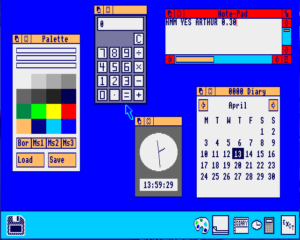
Arthur was a very rushed operating system, only developed because of repeated delays and setbacks in the development of ARX, a much more sophisticated venture. For these reasons, ARX was eventually abandoned and development effort was put into Arthur.
RISC OS 2
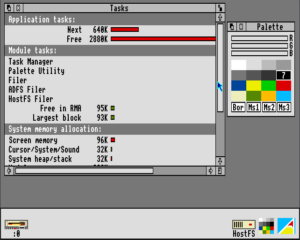
Because of its bugs and failings, Arthur was replaced in April 1989 with a newer version of the OS. Arthur 2 would also have much improved colour scheme, and a new name – RISC OS 2.
ARM3 support was released into RISCOS 2.01 along with VGA and SVGA modes.
RISC OS 3
Version 3.00 of RISC OS, released in 1991 for the A5000, brought many improvements and was almost four times larger than RISC OS 2 at 2MB. It contained enough bugs (or possibly severe enough ones) that RISC OS 3.1 was released only months later for only the cost of postage. Version 3.11 was released as a small bugfix over 3.10 that fixed some serial port issues.
RISC OS 3.50 was released in 1994 with the first Risc PCs. Since the architecture of those machines had substantially changed over the Archimedes range, there were issues of backward compatibility, most notably with games. Version 3.50 was not made available for the older machines.
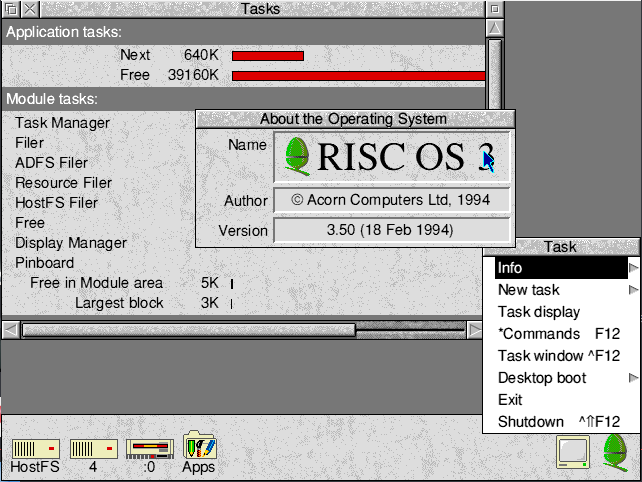
In 1995 came the substantially larger RISC OS 3.60 – now 4MB. In that version, hard disc support had been improved, and TCP/IP was added as standard in addition to Econet3. ARM 7 and 7500 support was added. RISC OS 3.60 was the basis of NCOS4.
RISC OS 3.70 was released in 1996 with StrongARM support. RISC OS 3.71 was a small update release to support the ARM7500FE in the A7000+ – this processor featured floating point hardware support.
This was the final release made to the RISC OS operating system by Acorn themselves.
RISC OS 4
In January 1999, Acorn stopped all work, except on set-top boxes and renamed to Element 14. They attempted to keep RISC OS going, and in March exclusively licensed it to RISCOS Ltd. (formed from a consortium of dealers, developers and end-users). Pace purchased the rights to NCOS. The separate work by RISCOS Ltd and Pace resulted in a code fork which continued after Castle Technology acquired the license from Pace.
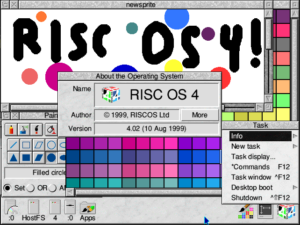
RISC OS 3.8 development was started by Acorn for the discontinued Phoebe machine and continued by RISCOS Ltd., who released it as RISC OS 4 in July 1999.
During 1999 and 2000, RISCOS Ltd. released versions of RISC OS 4 to support several additional hardware platforms.
RISC OS Select and Adjust
In May 2001, RISCOS Ltd. launched RISC OS Select, a subscription scheme to get the latest OS updates as soft-loadable ROM images, loaded at boot time.
In June 2004, RISCOS Ltd. released the ROM based version 4.39, being dubbed RISC OS Adjust.
The A9home, released in 2006, used RISC OS 4.42 Adjust 32. This was developed by RISCOS Ltd. and supports 32-bit addressing modes found on later ARM architectures.
Further releases under the Select scheme were made under the RISC OS Six branding.
RISC OS Six
from archive.org
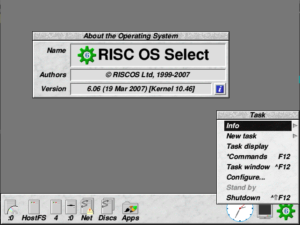
In October 2006, shortly after Castle Technology announced the Shared Source Initiative, RISCOS Ltd announced RISC OS Six, available under the Select scheme as Select 4. It was released in April 2008 with preview releases before that.
RISC OS Six brought portability, stability and internal structure improvements, including full 26/32-bit neutrality. It was now highly modularised, with legacy and hardware specific features abstracted, and other code separated for easier future maintenance and development.
Select 4 releases were initially not compatible with all machines, as the company did not have test machines available or access to some required proprietary code.
In April 2009 the final release of Select 5 was shipped and in December of that year RISCOS Ltd. shipped their final release of RISC OS, Select 6i1.
RISC OS 5
RISC OS 5 was released in July 2003, initially a separate fork by Castle Technology Ltd. written to support their Iyonix PC. It was based upon work done by Pace for their NCOS based set top boxes and although a wealth of software has now been updated, a few older applications can only be run on RISC OS 5 via the Aemulor emulator. RISC OS 5 includes support for PCI graphics and other hardware interfaces.
RISC OS 5 is still being developed by RISC OS Open Limited.
Shared Source Initiative
In October 2006, Castle Technology Ltd. started a venture to release elements of RISC OS 5 under a source sharing license. Phased releases started to appear from the following May. The Shared Source Initiative (SSI) was a joint venture between Castle and RISC OS Open Limited (ROOL), a newly formed software development company, releasing source without royalty for non-commercial use, while commercial usage incurred a per-unit license fee to Castle.
By October 2008, enough source was released to build an almost complete Iyonix ROM image, and by late 2011 it was possible to build complete ROM images.
In 2018 RISC OS Developments (according to their website) acquired Castle Technology Ltd. and with it the RISC OS Intellectual Property. RISC OS remains under the stewardship of RISC OS Open Ltd.
References
- Wikipedia – History of RISC OS – worth a read if you want more nitty gritty detail. Most of this page is taken from Wikipedia.
- RISC OS Open Limited – you can download modern RISC OS 5 from their site, including for the Raspberry Pi.
- RISC OS Developments
- RISC OS Rom Collection on Archive.org – The pictures of the RISC OS desktop versions are taken from here
- Reduced Instruction Set Computer – A RISC processor has a simplified set of instructions compared to a CISC (Complex Instruction Set Computer) meaning that it can obey those instructions much faster even though it might take more of them to perform a similar task. ↩︎
- Acorn RISC Machine – it was such a huge success that a separate company (ARM Ltd.) was spawned off and the A in ARM was changed to stand for Advanced. ↩︎
- Econet is Acorns own proprietary networking. It was available for their BBC Micro and Master series (and some earlier machines) as well as Archimedes and RiscPCs. ↩︎
- Network Computer Operating System – developed for use in Oracles Network Computers and shipped in Acorns Netchannel NCs. ↩︎