BBC Microcomputer Model B
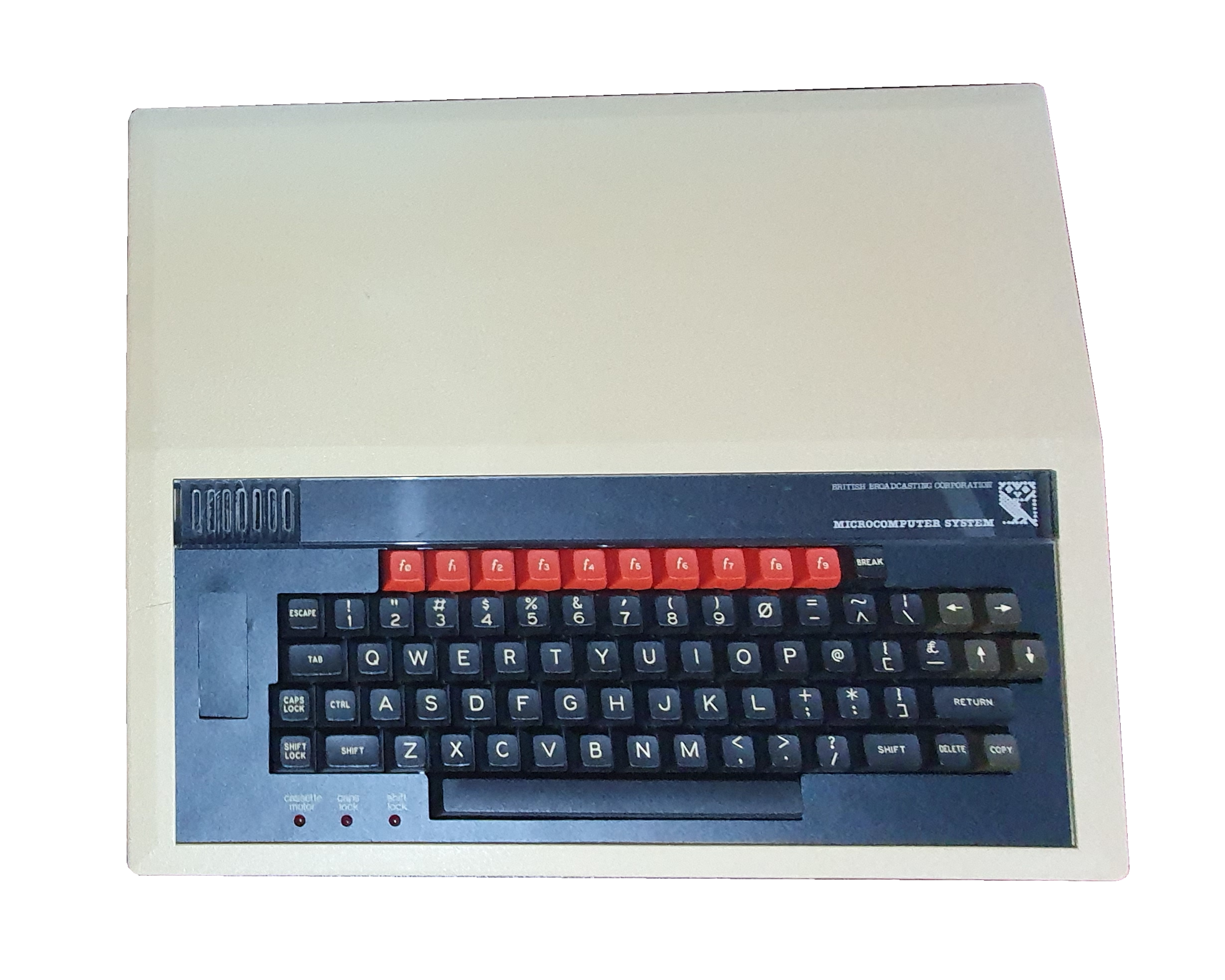
One of the most iconic 8-bit micros in the UK, this is the BBC Microcomputer Model B. Made by Acorn Computers and so named because it was commissioned by the British Broadcasting Corporation; it was affectionately known as the Beeb. It was first released in December 1981 and found its way into nearly every British school through the British Broadcasting Corporation’s Computer Literacy project.
In 1986, the BBC Master was released as an upgrade. It included most of the upgrades that users added to their beebs, along with enhanced software and a numeric keypad. Even so, the model B was still in production until 1994. The Master was also included in the BBC Computer Literacy project. Finally in that project, Acorn released the Archimedes line of computers (powered by their own Acorn Risc Machine – ARM – processor). Only the first few Archimedes’ were badged as BBC computers, initially the A305 and 310 then the A3000.
The beeb was not the cheapest of the 8-bit micros, Sinclair being the leader on that front with their ZX range. The ZX Spectrum was the cheapest colour computer, and the best selling of the beebs contemporaries, at least in the UK. The BBC Micro also did well in Australian schools. Acorn did make an attempt to enter the American market, but failed – that computer is extremely rare.
Despite it’s expense, the BBC Micro was still the choice of many home users (who could justify that expense) as it was the same computer that their kids had at school. In an attempt to cover more of that market, Acorn released a cut-down version, the Electron. In line with all Acorn machines it retained a good mechanical keyboard, but drastically cut back on built-in expansion, opting instead for an expansion edge connector like most of it’s contemporaries. The combining of most of the system logic to one chip made it smaller and cheaper to manufacture, but the memory was seriously compromised, and the well used mode 7 teletext chip was also dropped. These changes reduced its compatibility somewhat but, after release hiccups, the machine still sold well.
Hardware
Display system
The BBC Micro had a fairly unique video subsystem in that it had two graphics controllers – one for more traditional bitmap graphics and one for the teletext mode. Mode 7, as it was numbered, was very frugal in its memory requirements but still provided some graphics, in the form of 2×3 ‘pixel’ characters. There were control characters which changed colours, set text to flash or be double height, etc. Each control code took a character position on the screen. If you’re old enough to remember teletext on your TV (for example the BBC’s Ceefax service, or ITV’s Oracle) this does that kind of display.
The other modes (0-6) were more traditional, bitmapped graphics display modes provided through the systems 6845. As to be expected, the higher the resolution, or the more colours you wanted on screen at one time took more of the system’s memory. For example, the 20K mode 0 had just 2 colours (background and foreground) but could display 80 columns of text at 640×256 pixels; mode 2 (also 20K) could display all 8 colours at the same time, but at a lower horizontal resolution of 160×256 pixels (20 characters across). Modes 3 and 6 were designed for text rather than graphics and had a space between each line of text that displayed the same colour as the screen border, saving some memory. There were also 10|K screen modes which were even more limited.
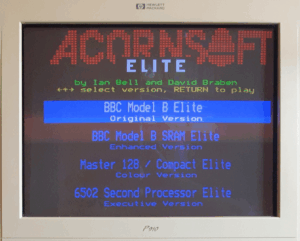
Despite this limitation, the 6845 chip could have its graphics settings rapidly switched. Using a timer build into one of the machines 6522 VIAs, and reset on video flyback (i.e. when the electron beam got back to the top of the screen), the display mode or colour palette could be changed mid-screen. This technique was used effectively by games, most famously Elite. In Elite, the main playfield was in a higher resolution monochrome mode, whereas the heads-up display was in colour and at a lower resolution at the bottom of the screen.
Sound system
The sound system on the Model B was provided by another standard chip, the SN76489 by Texas Instruments. The chip could provide 4 voices, one of which was dedicated to producing white noise (with some variation). It was used in many other computer and arcade machines at the time.
The operating system then enhanced this by allowing ‘envelopes’ to be defined. This would define a volume and tone profile for sounds, giving basic ‘instruments’.
As well as the 76490 sound chip, the Model B also allowed for a speech system. This was not fitted by default but space was included on the motherboard for the necessary ICs. The main components of the system are the TMS5220 speech synthesisor and the TMS6100 phrase ROM. In addition, the system also upgraded the Model B to take cartridges in the ‘ashtray’ push-out to the left of the keyboard. I’ve never seen it done or heard of any such cartridges. I’ve only ever seen the astray being used to house a ZIF socket for sideways ROM chips.
The 6100 phrase ROM is apparently on of many variations available, a different number is also printed on the chip to indicate what the contents are. The 5220 was used in arcade machines and pinball machines with different versions of the phrase ROM. There is even an American version for the BBC Micro. The English version is apparently voiced by Kenneth Kendal (a BBC news reporter).
The speech system inserts it’s output into the beebs sound system just like another sound channel. Also, the 1MHz bus connector has a sound channel that can be used for that. There are devices such as the Music5000 sound device that plugs into the 1MHz bus and thus its sound output is also blended with the system sound.
Keyboard
The BBC Micro, Master and Electron all had good mechanical keyboards, unlike a lot of their contemporaries. Sinclair were well known for their awful keyboards, offset by their cheapness. The calculator-style keyboard of the Oric 1 was also pretty bad. There were others, like the Dragon and Commodore 64 computers which had decent keyboards.
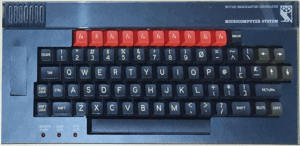
The keyboard on the beeb was, I suspect, in part chosen to be robust for school children to be able to hammer at. I doubt that a ‘dead flesh’ speccy keyboard could stand much abuse at all.
On the BBC Model B, there is a place to the left of the keyboard with a push-out cover. This cover was often pushed in by school kids. By default there is nothing beneath it apart from a space on the keyboard circuit board to add some edge connectors. Also on the keyboard board there is the possibility to add another ribbon cable to connect it to the main computer PCB. This is part of the speech system upgrade, but is not necessary for its operation. I’ve never seen or heard of it being installed or used. The only use of the ‘ashtray’ that I’ve heard of is to install a ZIF (Zero Insertion Force) socket. It would connect back to a chip header plugged into one of the sideways ROM sockets to allow a ROM chip to be easily inserted and changed.
The keyboard PCB also allows for system configuration switches to be installed. Normally these are not populated but can be installed and used to set only a few things: the start mode, disk drive speed and auto-boot state of the machine.
Expansion Ports
Most 8-bit computers from the 70s and 80s had a small number of ports on them. Ignoring the outputs for a screen, the ZX Spectrum, for example, had an expansion port for most add-ons and ports for a cassette recorder. The Commodore 64 had a few more, like a user port, disk drive port and joystick ports. The beeb, however, went further. It had the most amazing array of expansion connectors, possibly the most for ant of the 8-bit micros. These were:
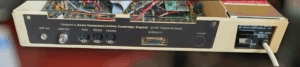
- RGB Video – the best way to view the output was through this connector. It was digital RGb, only supporting 8 colours.
- Composite Video – normally a monochrome composite output, but easily modified to make it colour.
- UHF Video – the usual (for 8-bit) connection for plugging into a TV aerial connector. This was by far the worst display option.
- Cassette – this was the standard way to get data (including programs and games) onto and of the computer. In the beebs case this was provided through a DIN connector rather that the Spectrum’s two 3.5mm jack ports.
- RS423 – this was chosen for serial communications rather than the more commonly used RS232. It is supposedly an improved standard over RS232 but retains compatibility.
- Analogue in – This port was used (mainly) for joysticks.
- Econet – this was an optional accessory for networking Beebs, Masters, Archimedes and other Acorn machines together. Econet was a proprietary Acorn system that allowed many computers to connect to a file server which could have expensive (at the time) hard drives or floppy drives attached.
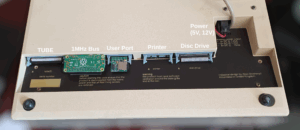
- Floppy – this was another optional expansion. Acorn designed the Model B with an 8271 double density, double sided disc controller in mind. It was quickly replaced by third parties with a 1770 high density controller. The chips were not compatible, so a daughter board had to be plugged into the 8271 chip socket and some minor changes needed to be made to the support electronics on the mother board. Acorn soon released their version of the 1770 upgrade which was essentially the same. The filing system software for 1770 retained full compatibility with Acorns original DFS (Disc Filing System). The 1770 also allowed the more advanced ADFS to be used (yes, the A stands for Advanced). DFS and ADFS both require memory to operate reducing the available space for programs. ADFS more so. For this reason ADFS was much less popular. This problem was alleviated on the Master with dedicated RAM for sideways ROMs (especially filing systems).
- External power – this connector was used to provide 5V and 12V power for floppy disc drives from the beeb itself rather than them having to have their own built-in power supply.
- Printer – a parallel port on the bottom of the machine provided (through an appropriate cable) connection to a printer with a standard centronics port. There were serial port printers available, but the centronics parallel port was most popular, especially for home, dot-matrix printers.
- User – this was connected internally to one side of a 6522 Versatile Interface Adapter chip, providing (as the name suggests) versatile external interfacing.
- 1MHz bus – this port was used as a multi-purpose expansion. Devices that used it included the Winchester hard disc and the Music 5000.
- TUBE – a port designed for the connection of so-called Second Processors. This was genius. A second processor would take over the running of programs and the BBC’s 6502 would take care of I/O, like keyboard, disc drives and Econet. Second processors were released by Acorn and others, such as 65C02, 80168 (it runs a version of DOS Plus which is mostly compatible with MS-DOS 1 and 2), 32016 (which runs Acorn’s own Pandora and Panos), Z80 (which runs CP/M) and others. The Arm chip was developed by Acorn as a second processor in this way.
Econet Networking
Not many of the 8-bit computers had the ability to connect to other computers, apart from, sometimes, through a serial port. Not many even had one of those. The BBC Micro, however had a serial port and an Econet port, which could connect to a proprietary Acorn network.
Econect was not built into many computers; on the Model B it involved installing components onto the motherboard; on the master you just plugged in an expansion board; the Archimedes was similar and on the Electron it was only ever produced by third party Barston Computers. Econet was first developed for the Atom in 1980 (according to Wikipedia) and made available for many machines, even though it was made popular in a school setting on Model B’s and later computers.
Econet networking allowed users to load and save from a file server – either a dedicated Filestore or a beeb or Archimedes running the Fileserver software (of which there were 4 levels). The network cabling infrastructure consisted of a 5-pin DIN cable per-machine, connection boxes from there to connect the computers together. In the middle of the network needed to be a relatively inexpensive clock box to keep everything in sync. In the early days networking a classroom worked out cheaper than adding a disk interface and drive to all of the machines.
A server could be a Model B or Master running the fileserver software, Level 2 and above needed a 6502 second processor. The different levels provided improved functionality and better user file store separation. Version 1 split a DFS disk’s 31 files between station numbers – no user login was included. Level 2 allowed many more files in hierarchical structure. Level 3 included Winchester hard drive support and Level 4 was made available for Archimedes computers.
A number of years ago, probably sometime around the end of the 20th century, I owned a couple of Model B’s and an A3000. I connected them by Econet and started to write fileserver software based on information in the Archimedes developer manuals (I acquired a slightly faulty version). I never completed full support for all commands, but it did work. Since then I lost all my Acorn kit on a house move, and the Model B I now posses was a much later eBay purchase.
Add-ons/expansions
The community of BBC enthusiasts is one of the largest I have seen outside of the US. There are plenty of original add-ons and expansions as well as modern versions of expansions that have become rare or expensive. There are even new modern devices that were never available, or sometimes not even possible, when the machine was current. The ones I have are:
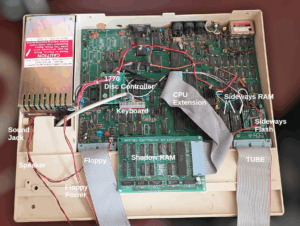
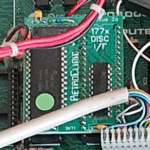
1770 disc controller – Retro Clinic provide a modern 1770 disc controller daughter board. It’s completely compatible with those made back-in-the-day, but it’s a lot cheaper. [Modern recreation of original]
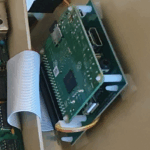
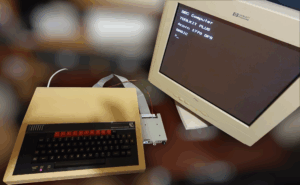
PiTubeDirect – this is a small board which does nothing much apart from level shifting. That allows a Raspberry Pi to connect to the beeb’s TUBE port. With appropriate software the Pi emulates every second processor ever made for the BBC Micro, switchable with a simple *FX command. The only game I know of which makes use of a second processor is Elite. It’s also famous for this (among other things). It uses the 65C02 second processor. More about this below… [Modern]
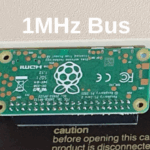
1MHz bus level shifter – this is the same sort of device as that for the TUBE but for the 1MHz bus. It can allow a Pi to pretend to be a SCSI hard disc (compatible withe Acorns ADFS) or a Music 5000. It does other things like memory expansion, but those aren’t use by anything that I know of. [Modern]
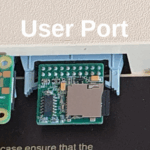
TurboSPI – this is one of the most amazing modern add-ons. It plugs into the user port and an appropriate filing system ROM is installed called MMFS and allows the beeb to access hundreds of virtual discs on an SD card. The default image that comes with it contains a menu system that gives access to hundreds of games. And it’s pretty fast too. [Modern]
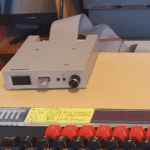
Gotek – this is simply a floppy disc emulator. The version I have has an OLED display and a rotary dial. You can see which disk you want to pretend to insert and it lets any computer access it just like a real floppy disc drive – and, unlike the TurboSPI, that also includes the speed. [Modern]
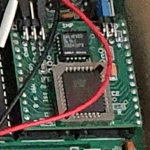
Sideways RAM/Flash – A way to expand the memory of the beeb. [Modern]
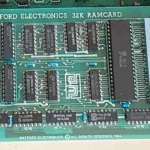
Watford Electronics 32K Shadow RAM Expansion – This takes over screen memory and adds printer or serial port buffers. [Original]
Viglen PC-style case
When the BBC Micro was expanded, with floppy drives and “cheese-wedge” second processors, it could become an ugly beast. There were two companies that endeavoured to rectify the problem by providing alternative cases, in the PC desktop style.
The one I have was made by Viglen, and it’s a plastic case. The other one was made by Oak and it’s made from steel. Both designs have a separate keyboard and replace the top half of the BBC’s case making in rectangular.
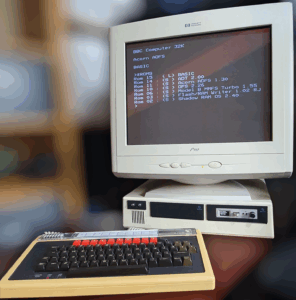
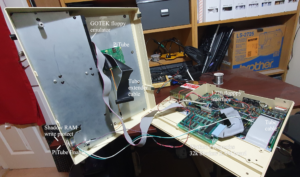
The top half of the Viglen case contains thick metal support for two 5.25″ floppy disk drives (commonly added to a BBC Micro). The standard way to attach drives in a C is through holes on the sides. This case expects holes on the bottom of the drives.
I chose to go with a Gotek modern floppy-drive emulator rather than two real floppy drives. It came in a 3.5″ case, so I needed to buy adapters. These expected to be mounted PC-style and had no mounting holes on the bottom. Since they were plastic, a drill and some self-tapping screws solved with this problem.
There is a grill on the front of the case for a speaker and above it a rectangular hole. I can only assume that a badge or something originally went here. My partners brother is pretty arty, so I asked him nicely to make a plastic piece that could hold a couple of switches. These I used to enable my PiTUBE direct and write-protect by sideways RAM (some ROM images test for writeability and need this in order to work from RAM).
The only sockets required for internal devices tend to be those on the underside. The ribbon cables can easily, and cleanly be rerouted. The power cable for the floppy, likewise. The keyboard, unlike that for a PC, is hard wired but there is enough space around the power connector to feed it through.
Software
Architecture
The processor on the BBC Micro is the 6502. A variant of this is also used on the Master and the Electron. The other common microprocessor in use in 8-bit micro’s like the ZX Spectrum was the Z80 (a Z80 second processor is available for the beeb). These processors are so named as 8-bit becase their data bus is 8 bits wide making a memory read operation able to pick up only 8 bits at a time. The address bus on such processors is twice as wide – 16 bits – which means that 64K of addresses are available. On the 6502, I/O (such as keyboard, and floppy disk) needs to have some addresses in this 64K reserved for such use. On the Z80, there is a separate area of memory reserved for I/O in addition to the 64K for memory.
On the beeb, half of the memory is RAM and most of the rest is ROM, with a small amount reserved for I/O. 16K of the space reserved for ROM is paged, so that many ROM’s can appear in the same place in memory, switched in and out using a register in I/O space. These are the sideways ROMs at &8000-&BFFF (hexadecimal addresses which equate to 32K-48K in the memory map). The operating system, immediately above that, is not paged so that any of the sideways ROMs can call OS routines directly easily and quickly.
| 0000-00FF | Zero page RAM |
| 0100-0DFF | RAM used by OS and Sideways ROMs |
| 0E00-18FF1 | RAM used by DFS (if installed) and other filing systems. |
| 1900-7BFF2 | RAM for use by programs, the current language (normally BASIC), etc. |
| 7C00-7FFF | Screen RAM (how much depends on the screen mode) |
| 8000-BFFF | Sideways ROM/RAM (e.g. DFS, BASIC, View) … (16 banks of paged memory) |
| C000-FBFF | OS ROM |
| FC00-FEFF | I/O etc. |
| FF00-FFFF | OS vectors |
As you can see, the memory available to programs depend on the installed filing system(s) and which screen mode you are in. TAPE uses nothing but if ADFS, DFS and MMFS are all installed, it rises from &0E00 up to &2100. You can use what’s known as E00 versions of the file systems which run from sideways RAM and use memory in their RAM slot leaving the program base at 0E00 (hence the name). This obviously won’t work for ROM or flash. The internet tells me that there was once a hybrid sideways ROM which had some RAM onboard to perform the same thing.
The division between OS and language (in sideways ROM) is well defined in the BBC Micro’s architecture. This allows for the replacement of BASIC with another language, such as Forth, or a word processor or spreadsheet (which are also classified as languages). A language ROM differs from a utility or file system ROM in that it becomes the man running program, like BASIC would be by default. The position of the chip in the computer determines which starts up by default. The rightmost socket is bank 15 and that is the language to be used. Often a star command (described below) is provided to switch languages (like *BASIC or *VIEW).
This division of OS/language also means that expansions to BASIC would only add new BASIC commands, which is a technique that has to be employed on other computers of the time. On the beeb, however, Acorn provided an interface to OS and utility ROMs knows as star commands (so named because they are often introduced with a *). Using this technique, utility ROMS could provide extension accessible through star commands in any language and the OS could provide *FX or *HELP commands.
*HELP is an operating system provided command which all ROMs get the chance to respond to. It can be used without arguments to provide an overview of the ROMS installed in the system. With an argument, it can provide a list of individual commands or help text made available by a particular ROM.
*FX is an example of a star command provided by the operating system to set system “special effects”, such as the key auto-repeat delay (*FX 11,n) or set the RS423 baud rates (*FX 7,n and *FX 8,n). It’s an interface to the system’s internal OSBYTE system call with the arguments passed as the A, X and Y registers.
Sideways ROM (and RAM)
Since the BBC Micro (along with many other 8-bit micros) only has a limited memory space, part of that space is reserved for banked ROMs. Acorn call such software Sideways ROMs. Each is 16K in size and there can be up to 16 of them (although there are only 4 available sockets on the motherboard).
Example of sideways ROMs include the Disk Filing System (DFS), BASIC, Utilities, Word processors and Spreadsheets.
Sideways ROM images were often copied and burned onto EPROM. This required an EPROM programmer to write them and an EPROM eraser to make the EPROM chip reusable again. The chips would have to be plugged in and removed in order to use the facilities provided by the software. Obviously, this is not ideal if you have a number of sideways ROMs you wish to use. Expansion board were manufactured to allow more than four to be installed at a time.
A common addon that came after ROM expansion board, was sideways RAM. This is simply static RAM installed in sideways ROM banks and can be done quite simply. Manufacturers came up with products that gave many banks of sideways RAM. Initially, this RAM was just used as a quick way to install sideways ROM images from disk without having to take the lid off their beeb. Due to the popularity of this expansion, software developers started to make use of it too. For example, there are versions of Elite and Exile that can use it to expand the games.
A modern sideways expansion is flash memory. This is, of course, non-volatile and due to its nature no software will accidentally overwrite it like RAM.
In my beeb I have installed 8 banks of flash and 4 banks of RAM. There are static RAM chips which are mostly pin compatible with the 16K ROM chips originally intended. Two pins need to be bent up and connected to the flash board to provide R/W and to select between the 2 halves of the chip (to provide 2 sideways RAM banks per chip).
Second Processors and the TUBE
Of the many unique and interesting expansions for the BBC Micro are the second processors. These allow the beeb to have a second, co-processor to do the running of programs, leaving all that tedious I/O to the beebs 6502. The second processor would connect to the BBC through Acorns proprietary TUBE port using a proprietary TUBE chip (which was included on the second processor itself). The device could have almost any processor, not just a 6502 compatible one. Some that were made included 65C02 (as you’d expect), Z80, 80168, 32016 and others.
The second processor for the Model B came in a box styled to sit next to the computer, with it’s own power supply and a cable that connected to the beeb’s TUBE port. The cable was kept as short as possible for electrical reasons. The shape of the box lent itself to the affectionate term ‘cheese wedge’. The Master had an internal TUBE port as well as the Model B compatible one on the bottom. On the Master, this could be disabled in software whereas on the Model B you just had to keep it switched off.
65C02
The most common was, unsurprisingly, the 65C02. This was a version of the beeb’s main processor, unencumbered with all that pesky video, sound, floppy disk access and other I/O. Versions were clocked at a higher rate than the beeb’s 6502 giving the micro a significant speed boost. It also had it’s own memory space, so it could have most of it’s 64K taken up with RAM that could nearly all be used for programs, giving it a memory boost too. The OS on the second processor was very minimal, simply passing most system calls over the TUBE to the beeb. Since this included all I/O access, including keyboard and screen, this was mostly transparent to software.
Software for the second processor could be stored in a sideways ROM chip as well as on removable media. In order to be used, the software would have to be run in the memory space of the second processor. One of the functions of the TUBE chip was to transfer that software over the TUBE bus. The problem with this is that 6502 machine code is not relocatable. That means that if the code was designed to run at &8000 (like sideways ROMS were), it would need to be copied into the second processor at &8000 to run.
BASIC was one sideways ROM that was used in this way. Since the CPU on the second processor was compatible with code written for the beeb itself, many ‘languages’ could run on it. Languages in Acorn parlance included word processors and spreadsheets which used the main memory like BASIC did. BASIC itself was just another ‘language’ that could run on a beeb.
So, BASIC would be copied over the TUBE into the memory on the second processor at &8000 and run from there. Since the OS and I/O memory on the beeb’s main processor live at memory above the space allocated to sideways ROMs and the second processor needs very little of this, there’s a lot of wasted RAM that BASIC can’t use. In order to work around this, you could use HiBASIC. It runs higher up in memory giving more contiguous space for programs to use.
Any software written in BASIC (or most languages, no doubt) would work just fine when run on the 65C02 second processor. Not so much for machine code programs, especially games. One game (to my knowledge, the only game) that did make use of the 65C02 second processor was the famous Elite.
32016
Acorn had captured the British secondary school market with it’s collaboration with the British Broadcasting Corporation. It had even got it’s computers into primary schools. Higher education was something that it now looked at. The Cambridge Workstation was something that Acorn Scientific came up with, along with the more traditional 32016 second processor in a ‘cheese wedge’ box.
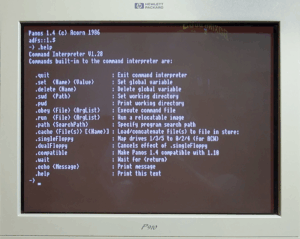
The Cambridge Workstation was a device I owned, but gave away when I moved house. I wish I’d kept it now. It’s like a plasticky rounded squareish box, slightly bigger than a monitor, with a separate keyboard. Inside it had a BBC Model B+ motherboard, a SCSI interface on the 1MHx bus with a second controller card which allowed it to connect to a Winchester hard drive. It also had a 32016 second processor and a floppy disk drive. With a switch, the computer could also be booted as a Model B+.
The second processor, when booted, started up Pandora. This provided BIOS-like functionality and a simple supervisor allowing the running of star commands through the I/O processor’s OS. From Pandora, Bas32 (a version of BBC BASIC) or the Panos operating system could be started. Software could also be compiled to run on it.
The operating system of the 32016, Panos, was written by Acorn Scientific. It came with a C compiler, Fortran, Lisp, Pascal and a graphical text editor. It also had access to DFS, ADFS and NFS through a filename translation layer.
80186
This second processor is installed on the BBC Master 512 by default as an internal tube board. It is an upgrade to the 888 and 8086 processors but was never particularly as common as the 80286 and above in PC’s. It allows the beeb to be used as a DOS machine (with many limitations) and runs DOS Plus and GEM.
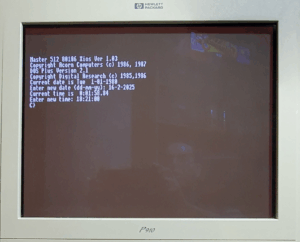
DOS Plus by Digital Research is an OS compatible with Microsoft’s MS-DOS 1 and 2 and also with DR’s CP/M-86. GEM for the beeb requires a mouse. Since the beeb has no mouse port, the user port was employed for the task. A special driver was also required in order to use it and that driver would have to be able to access memory over the TUBE. Acorn made the decision that they would write a GEM driver for the mouse but that wouldn’t work in DOS Plus. Since it was not needed in DOS Plus, some of the OS code that would handle it was omitted (for space reasons) and so implementing such a driver was made much harder. This was later achieved, though. I don’t have a mouse, or the driver, so I’ve not been able to try it out.
Another consideration would be graphics. The 80186 second processor implemented a version of CGA graphics. The beeb’s graphics are not cable of displaying all the CGA modes so some compromises had to be made. The fact that the TUBE fell between the program code and the graphics memory was another issue along with the differences in display memory formats. To solve this, memory was reserved in the 80168 memory map to hold the CGA image and translation code would regularly look for changes and send changes lines over the TUBE. This is done 10 times a second and worked reasonably well.
One of the other differences experienced mostly in games was around keyboard access. Since the keyboard controller was not in the 80186 memory, programs which accessed it directly found that it didn’t work. This was later alleviated somewhat by a piece of software called PCCE, which added some compatibility.
PC’s (of the era) liked to have 640K of main memory, not including video memory. The 512 of the name “Master 512” refers to the amount of memory on the second processor. This is not including the required overheads like video memory and the extra space needed by DOS Plus over MS-DOS. This means that more memory was actually used by the system and less was left over for programs (I’ve heard a figure of 20K mentioned – which is quite a lot of 512K, which itself is less than the 640K expected by some programs). The PiTube Direct doesn’t have the same memory restriction.
The other limitation of the 80186 co-processor is the lack of sound card. Often when games try to access it they will crash. Those that have the option of ‘no sound’ will work fine.
Z80
The Z80 second processor allows the use of CP/M. This operating system predates DOS and has no expectations of sound or graphics. This makes it more compatible on these fronts that DOS Plus.
Games
Even though it had something of an education bent and nowhere near the home following of other computers, like the ZX Spectrum and Commodore 64, the beeb still had a number of games. The TurboSPI (and MMFS) tends to come with an SD card full of games and a quick Shift-Break boots into a convenient menu.
The following is a list of (in my opinion) some of the better games on that card, and some of the more famous ones. There are a good number of real stinkers and some copies of famous arcade games (some good and some really not so good).
- Alien 8 – isometric multi-screen action adventure
- Arkenoid – bound the ball at the bricks (breakout like)
- Arcadians – shoot ’em up
- Blockman – collect the bombs before they time out
- Bubble Bobble – simple platformer
- Boffin (and Boffin 2) – puzzle platformer
- Repton (and sequels) – scrolling screen, collect the diamonds, avoid rocks and monsters
- Bonecruncher – a more complex Repton-like game
- Boulderdash – collect the diamonds and avoid the rocks (like Repton but you can see more on-screen)
- Bug Blaster – centipede clone
- Bumble Bee – eat the dots in a grid, avoid the spiders, not pacman!
- Chuckie Egg (and 2 and 3) – platformer, collect all the eggs
- Omega Orb – platform adventure (look for a manual online)
- Castle Quest – horizontal 2D platform adventure game
- Codename Droid – 2D action adventure platformer
- Elite (and 2nd proc./SW RAM versions) – 3D space combat and trading
- Exile (and extended version) – 2D platformer adventure
- Sabre Wulf – 2D top down adventure
- All installed filing systems need some workspace. ADFS, for example, will use more than DFS, but if both are installed even more will be required. TAPE alone will not use any. The value shown is for just DFS. ↩︎
- The amount RAM used by the screen depends on which screen mode is in use. For example, modes 0, 1 and 2 use 20K and mode 7 only uses 1280 bytes. It always ends at 7FFF – the highest non-paged RAM location. The values shown are for mode 7 (teletext). ↩︎